Saturday, February 18, 2012

Confirmed: iPad 3 Will Have A Retina Display With 2048x1536

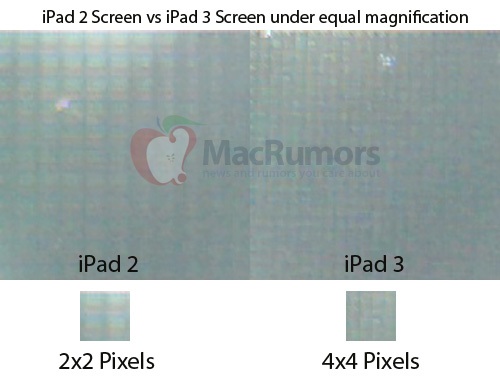
MacRumors has claimed to have one of the screens from iPad 3 production. They put it under the microscope and found out that it has 4 times the pixels as an iPad 2 or double horizontal and double the vertical.

Physically, the purported iPad 3 display is the same size as the current iPad 1 and iPad 2 display at 9.7" in diagonal, and looks quite similar to the naked eye. 
Extrapolating out, the iPad 3 screen should carry a full resolution of 2048x1536, exactly twice the linear resolution of the iPad 1 and iPad 2 which is 1024x768. Such a screen should be able to display much sharper images as compared to the previous generation iPads.  

We are just a few weeks away from the anticipated March 7th iPad 3 launch. The device is rumored to be carrying this high-resolution display, a new A6 processor and 4G LTE support.

You can follow me on Twitter, or like me on Facebook to keep yourself updated on all the latest news from Apple.

Source: MacRumors

Friday, February 17, 2012

Video Showing OS X Mountain Lion's AirPlay Mirroring in Action


Insanely Great Mac has made a video hands-on of OS X Mountain Lion's new AirPlay Mirroring feature.

From the video, I can see that it is running very smoothly. You will need to have an Apple TV to do this and it has to have version 5.1 b2 to do this.

Apple Starts The Countdown To 25 Billion Apps Download


Apple has started a counting down to the 25 billionth app download today, and has posted a new site promoting it.
As of today, nearly 25 billion apps have been downloaded worldwide. Which is almost as amazing as the apps themselves. So we want to say thanks. Download the 25 billionth app, and you could win a US$10,000 App Store Gift Card.* Just visit the App Store and download your best app yet.
There are two ways to win this promotion, who either download the 25 billionth app or who submits the alternate entry form immediately after the 24,999,999th app, whichever comes first.


You can follow me on Twitter, or like me on Facebook to keep yourself updated on all the latest news from Apple.

Source: MacRumors, 9to5mac

Thursday, February 16, 2012

OS X Applications That Mountain Lion Killed Today


Apple's merging of iOS with OS X continues today with the sneak peak at 10.8 Mountain Lion. Several apps and features have been replaced with iOS counterparts. Here is everything from past OS X releases that died today at the hand of Apple's iOS-ifying of Mountain Lion.

iChat: Mountain Lion introduces "Message" app, which when installed also replaces iChat and integrates your AIM, Yahoo!, Google Talk and Jabber accounts. With this you can send unlimited text messages to and from Macs and iOS devices. The new Message app also integrates FaceTime video chats.

iCal & Address Book: In Mountain Lion, Address Book and iCal have both been replaced with names of their iOS apps, "Contacts" and "Calendar". It also improves iCloud integration.

Growl: Apple's integration of a Notifications Center that is almost identical to iOS 5 doesn't completely replace the need of Growl. Apple's is letting developers integrate notifications into their app and we'll likely see further integration between Notification Center on iOS and OS X in future updates.


"Mac": Apple officially dropped the "Mac" from "Mac OS X". Mac has been part of the OS name for more than 10 years, and dropping the "Mac" will surely make things easier when the inevitable unification of iOS X is complete.

HDMI out: With AirPlay mirroring support in Mountain Lion, HDMI out is on the way out. It might not be the reason to throw to your HDMI cables right away, but the prospect of wirelessly beaming your Mac's screen to the upcoming Apple HDTV means Apple is likely to keep improving it.


Source: 9to5mac

OS X 10.8 Mountain Lion to Be Released This Summer!

Today, Apple website has an update on Mac OS X page for the developer preview of 10.8 Mountain Lion just 7 month after the launch of OS X Lion. You will find an interesting line on the page that read: Inspired by iPad. Re-imagined for Mac. 


From Apple:
Mountain Lion presents notifications in an elegant new way, and Notification Center provides easy access to alerts from Mail, Calendar, Messages, Reminders, system updates and third party apps. System-wide Share Sheets make it easy to share links, photos and videos directly from Apple and third party apps. Twitter is integrated throughout Mountain Lion so you can sign on once and tweet directly from Safari®, Quick Look, Photo Booth®, Preview and third party apps. Mountain Lion also introduces AirPlay Mirroring, an easy way to wirelessly send a secure 720p video stream of what's on your Mac to an HDTV using Apple TV®.
There are total of more than 100 new features with top 10 new features. Details after the break!

OS X Mountain Lion


iCloud

         There would be the cloud-power back up for your Mac with better integration. All your emails, notes, reminders, calendar, contacts and documents. It pushes all you data and activities from your Mac to iPhone, iPad and iPod Touch.


Messages

         In Mountain Lion, Apple has integrated the messages app to the Mac. You can send messages to all of your friends that have iMessage on their devices and the conversations will be pushes from iDevices to your Mac with iCloud.


The beta version of messages app for Mac is now available for download on Apple website!

Reminders and Notes

       The new and most used iOS 5 apps are coming to OS X Mountain Lion. The apps are both sync with iCloud so your items will show up on your other devices.

overview_reminders
  overview_notes
Notifications Center
overview_notifications
        Now the famous notifications center of iOS 5 is on the Mac! It works just like it does on iOS and it can be brought up with a simple swipe to the left.

Share Sheets
        
      You will find the Share button on many OS X Mountain Lion apps. You can send links from Safari or send your notes via Mail and Messages.

Share

Twitter Integration

          On iOS 5, there was a new twitter integration that you can tweet directly from the app. Now it's coming to OS X. You can send tweets right from your desktop and other apps including Safari. It is the same UI as in iOS. You will also get Twitter notifications from the new Notifications Center on your Mac.

Tweet Sheet

The are three more less major features include:
  • Gatekeeper: a security app (Apple is careful not to call it an anti-virus) which maximizes your Mac’s security by giving you controls over which apps are installed only from Mac App Store or recognized developers (or both!)
  • AirPlay Mirroring: Just like the iPad, you can mirror everything on your Mac to an HDTV connected to an Apple TV.
  • Game Center: Sign in with an Apple ID and start playing against friends on iPad, iPhone and iPod touch. Find new games, enjoy multiplayer gaming and more!
overview_gamecenter


Apple will be releasing OS X 10.8 Mountain Lion sometime this summer at an expected price of $29.99 via the Mac App Store.

You can watch the preview video here:


You can follow me on Twitter, or like me on Facebook to keep yourself updated on all the latest news from Apple
Wednesday, February 15, 2012

Apple's Suppliers Test 8-inch iPad

The Wall Street Journal reports that Apple is now working with suppliers on an 9-inch iPad on the diagonal. It is down from 9.7-inch display of the current iPad but is larger than Kindle Fire, which is 7-inch
Officials at some of Apple's suppliers, who declined to be named, said the Cupertino, Calif., company has shown them screen designs for a new device with a screen size of around eight inches and said the company is qualifying suppliers for it. Apple's latest tablet, the iPad 2, comes with a 9.7-inch screen. It was launched last year.
One person said the smaller device will have a similar-resolution screen as the iPad 2. Apple is working with screen makers including Taiwan-based AU Optronics Co. and LG Display Co. of South Korea to supply the test panels, the person said.


                    Macrumors' Mockup of 7.85" iPad on left, 9.7" iPad on right 

Tuesday, February 14, 2012

'Clear' To-do List App Arrives on the App Store!

The anticipated Clear to-do list application for the iPhone and iPod touch has made its way onto the iTunes App Store worldwide. The app is unlike any other piece of to-do list software as it includes a Multi-Touch optimized interface that functions like no other. For example, to create a new to-do, a user can either pull or pinch their to-do list. Clear’s promotional video above demonstrates the unique interface best. Clear includes the option to create specific lists, like iOS 5′s built-in Reminders application, and also includes some different color themes. The application is downloadable here for $0.99.


Clear for iPhone (Coming Soon!) from Realmac Software on Vimeo.